Evaluating Online Earning Platforms Before Sharing Browser Data

The growth of remote digital tasks, micro-jobs, and online commission opportunities has created diverse ways for users to participate in the digital economy. However, exploring new portals requires a disciplined approach to privacy and security. Before signing into an unfamiliar platform, connecting a social account, granting browser permissions, or entering payment details, users must evaluate the site’s operational architecture rather than relying solely on promotional descriptions.
Modern web applications may request profile information, account permissions, browser notifications, or access through a connected account. The important question is whether each request is necessary for the stated task. A structured review helps people limit unnecessary access while they investigate an unfamiliar service.
Security analysis begins with a neutral perspective. Technical signals such as domain age, identity masking in WHOIS databases, valid Transport Layer Security (TLS) certificates, or polished user interface designs are neutral indicators. They reflect standard hosting configurations rather than proof of safety or fraud. By establishing clear inspection procedures, users can objectively analyze earning portals before committing personal data.
Separating Marketing Claims from Technical Evidence
Promotional materials for digital task platforms frequently feature claims of high daily earnings, rapid payout schedules, flexible hours, and automated workflows. Those statements are marketing, not proof that a platform will pay, protect data, or remain available. Evaluate the exact account flow, published policies, support channels, and any independent records that are relevant to the claim.
Separate promotional promises from evidence you can check. Testimonial banners, payout counters, and compliance badges can be displayed without independent verification. Business records, terms, contact channels, and privacy disclosures can add context, but no single signal proves that a platform is trustworthy.
A critical step is comparing published policies with actual browser interactions. For example, if a platform claims to require minimal access but prompts users to install browser extensions or submit primary email credentials, a significant discrepancy exists. Claims must be backed by transparent technical specifications and verifiable organizational identity.
For broader context on assessing web-based tools and interactive interfaces before disclosing confidential details, readers can explore our guide on how to check an AI chatbot before you share private information. Applying systematic verification principles ensures consistent safety across web services.
Domain Identity and Account Security Infrastructure
Investigating domain infrastructure and authentication mechanisms provides valuable insight into platform operating standards. Start by examining the exact Uniform Resource Locator (URL) in the browser address bar. Phishing campaigns and deceptive task portals often utilize typosquatting, subdomains on free hosting services, or obscure top-level domains mimicking well-known brand names. Verifying exact spelling and root domain structure prevents accidental interaction with spoofed portals.
Domain registration lookup tools reveal historical details, including creation dates and registrar records. Treat WHOIS privacy services neutrally: while privacy protection is standard practice for legitimate domain owners avoiding spam, newly registered domains with hidden ownership details warrant thorough scrutiny. A recently registered domain operating without verifiable corporate ownership requires higher verification standards before users share personal information.
Account creation and recovery flows reveal which protections are available. Prefer a unique password and enable multi-factor authentication when the service offers it. Before relying on an account, confirm that its password-reset process reaches the contact channel you control and does not ask for secrets or payment. For steps that help protect a connected Google account, consult Google Account security guidance.
Users must maintain unique credentials for every web platform. Reusing primary email passwords across unverified task portals exposes users to credential stuffing attacks across other online services if a data breach occurs.
Auditing Browser Permissions, OAuth Scopes, and Extension Access
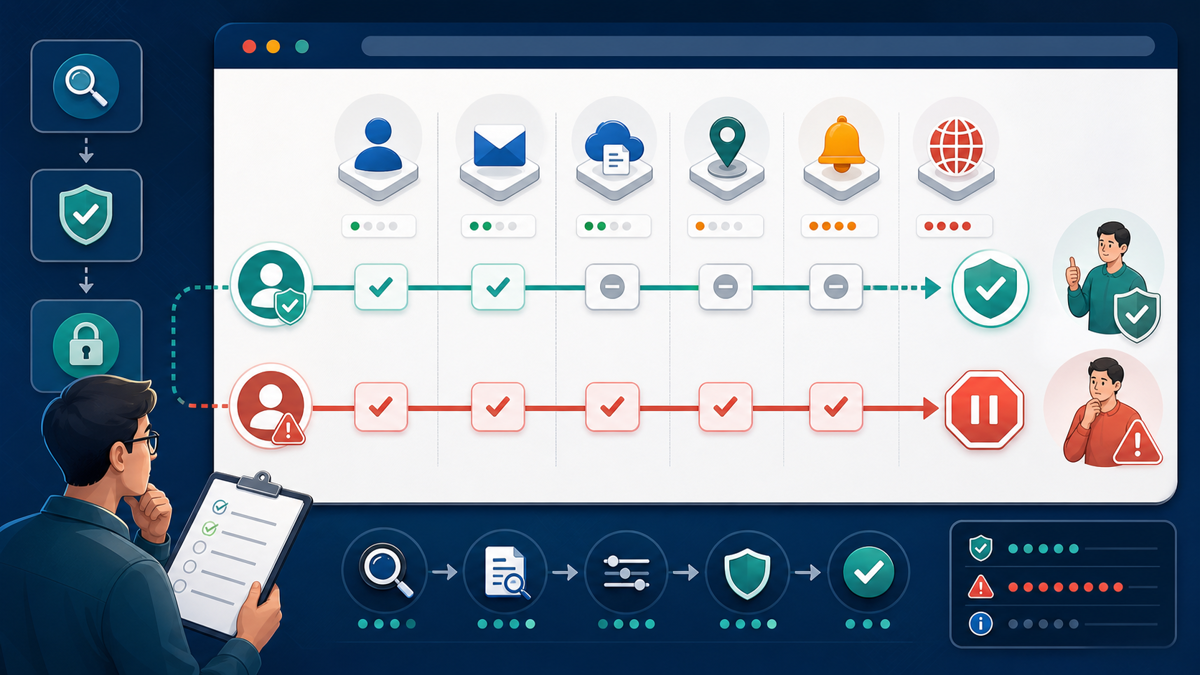
Online earning platforms often interface with browser environments to record completed tasks, process remote input, or track user activity. Evaluating requested permissions is essential to prevent privacy infringement and unauthorized data harvesting. When a platform requests sign-in via third-party Single Sign-On (SSO) protocols such as Google, Facebook, or Apple OAuth, carefully inspect the consent screen.
A basic sign-in request commonly asks for profile information such as a name and verified email address. If an unfamiliar platform asks to read or send email, access cloud files, or manage another account, pause and verify why that permission is needed. Connected-account authorization may remain in place until it is revoked, even after the browser session ends.
If a service requires a browser extension, review its developer, update history, and requested permissions before installation. An extension allowed to read and change data on many sites may be able to inspect information on the pages covered by that permission. Decline broad access that the task does not clearly require. For another neutral example, see our guide to verify MathBot access claims before sharing data.
Recognizing Phishing Patterns and Task-Based Scam Mechanics
Evaluating earning platforms requires recognizing structural patterns associated with online job and task fraud. Online task schemes often operate by presenting simple, repetitive actions—such as rating products, optimizing app listings, watching videos, or submitting data entries—in exchange for immediate balance credits. However, operational structures that require users to deposit funds to unlock earnings represent severe risks.
A common fraud pattern involves artificial task thresholds or tiered VIP memberships. In these models, users complete free tasks and observe an increasing account balance on the internal dashboard. When attempting to withdraw earnings, the system prompts the user to pay an administrative fee, tax charge, verification deposit, or upgrade fee to access higher tiers. Once paid, additional hurdles or fees are routinely introduced while withdrawals remain blocked.
Use a firm stop rule: do not send money to unlock a dashboard balance, complete a mandatory task order, or reach a higher payout tier. The FTC task-scam alert describes schemes that show supposed earnings and then demand deposits. Its broader job-scam guidance also warns people not to pay for the promise of a job.
Additionally, unsolicited outreach via messaging applications, social media channels, or encrypted chat platforms offering high-paying, low-effort work frequently signals social engineering tactics. Phishing operators often redirect users to external websites to collect credentials or financial identifiers. Users can learn more about identifying suspicious outreach strategies by reviewing CISA phishing recognition guidelines.
Verifying Payout Notifications in Official Financial Applications
Another critical area of evaluation involves payout processing and financial transaction verification. Online task portals often claim support for diverse payment methods, including digital wallets, electronic bank transfers, wire services, or cryptocurrency payouts. However, dashboard balances displayed within a platform interface do not represent real-world funds until successfully transferred to an external financial account.
Deceptive platforms may display simulated account balances or generate fake transaction hash records to create the illusion of earnings accumulation. Furthermore, scammers may send forged email notifications or text messages claiming that funds have been transferred but require a sender release fee or tax payment before clearing into the recipient’s wallet.
Verify incoming payments by opening the official wallet or banking application directly, rather than following a link in an email, pop-up, or chat message. Treat a dashboard balance or screenshot as unconfirmed until the transaction appears in the account you control. If someone asks for a fee to release a transfer or requests a refund through a different channel, stop and contact the financial provider through its official support path.
Verification Matrix and Practical Stop-Rule Framework
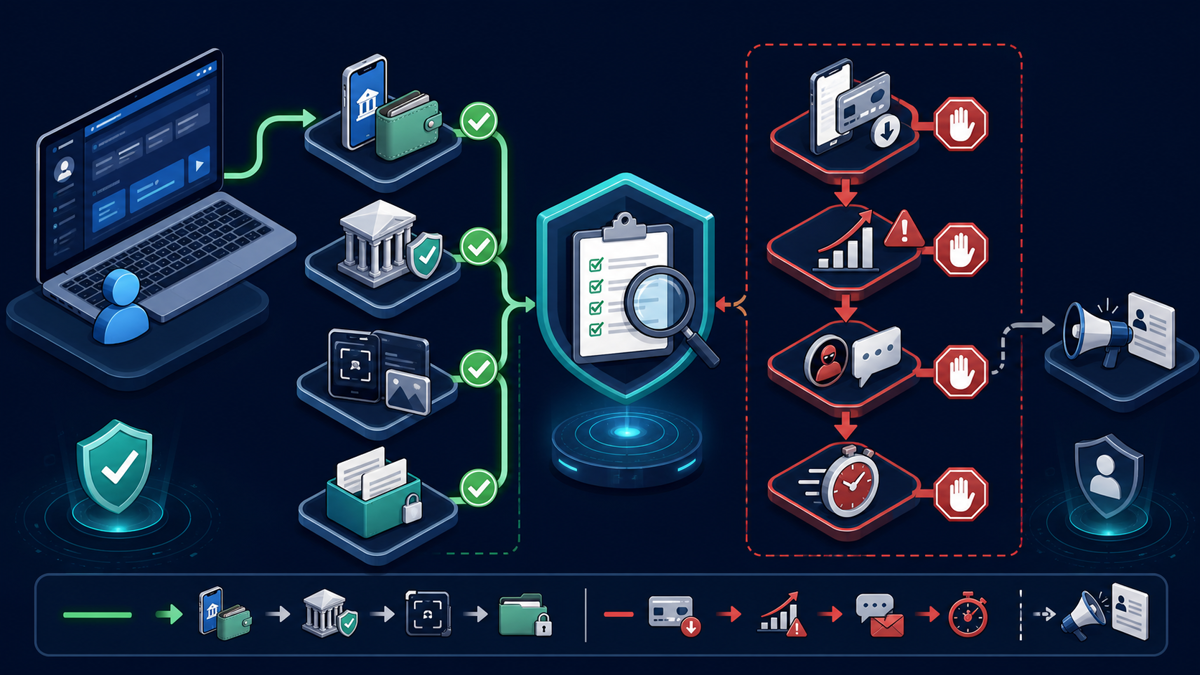
To ensure consistent safety when researching online earning opportunities, users should establish non-negotiable stop rules before beginning any task evaluation. Defining boundaries for time, data sharing, and financial commitments prevents emotional decision-making when navigating high-pressure platform prompts.
| Verification Stage | Core Technical Check | Neutral Signal vs Warning Sign | Recommended Stop Rule |
|---|---|---|---|
| Domain Identity | Inspect URL structure, domain age, and SSL/TLS certificate details. | HTTPS and WHOIS privacy are neutral signals; newly registered domain mimicking known brand is a warning. | Halt setup if domain spelling is deceptive or registration details mismatch official corporate filings. |
| Account Security | Evaluate password requirements, MFA support, and recovery email headers. | Standard password fields are neutral; missing MFA reduces protection, while suspicious reset messages require verification. | Never reuse primary passwords; stop if account recovery relies on unencrypted or suspicious mail channels. |
| Permissions & Data | Review OAuth consent screens, requested scopes, and extension permissions. | Basic profile scopes are standard; requests to access all web data or email inboxes signal high risk. | Deny access and abort registration immediately if requested permissions exceed basic authentication needs. |
| Financial Payouts | Confirm incoming transactions directly within official banking or wallet apps. | Internal dashboard counters are neutral; demands for unlock fees or tax deposits indicate severe risk. | Immediately exit platform if required to deposit money or pay fees to withdraw accumulated earnings. |
| Time & Effort Allocation | Track hours spent on unverified platforms relative to confirmed, cleared payouts. | Task progression alone is neutral; repeated threshold changes without a verified payout are a warning. | Establish strict trial limits (e.g., maximum 3 hours); stop participation if withdrawal thresholds keep increasing. |
Contextual Application: Reviewing Third-Party Platform Coverage
People researching an earning platform often encounter reviews, tutorials, and videos. A page discussing a current registration and browser-safety walkthrough, for example, is best treated as one procedural reference to compare with the general checks in this guide—not as proof of current operation, payment, safety, or legitimacy.
Third-party articles may describe how a system claims to work, including registration steps or stated payment options. Verify time-sensitive details independently and do not interpret a walkthrough, referral, screenshot, or ranking as an endorsement or guarantee.
When reading third-party reviews for any platform, apply the core evaluation checklist neutrally. Verify whether the underlying service operates under a transparent corporate identity, check whether requested browser permissions are strictly necessary, and confirm that payout mechanisms do not require upfront user deposits. Evaluating external reviews through an objective analytical lens allows users to gather information without making unverified assumptions.
Incident Response: Revoking Access and Reporting Suspicious Activity
If a user determines that an earning portal exhibits excessive data collection, unauthorized account activity, or deceptive payment demands, swift protective measures are necessary. Immediate action helps contain potential credential exposure and mitigates further risk to browser sessions and personal accounts.
First, revoke all third-party permissions granted during registration. Access the security settings of your primary identity providers (such as Google, Microsoft, or social accounts) and remove the application’s OAuth token from connected apps. If a browser extension was installed, immediately disable and remove the extension from your browser management menu.
Second, change credentials anywhere the same password was reused and enable multi-factor authentication where available. Third, preserve relevant evidence, including platform messages, transaction records, domain URLs, and support conversations. Keep private identifiers out of public posts and share records only through an appropriate official reporting channel.
Finally, report suspected phishing or deceptive payment demands through the relevant consumer-protection, financial-provider, browser, or hosting channel. Describe only what you observed and preserve the original evidence.
Frequently Asked Questions
What should I check before signing up for an online earning platform?
Check the exact domain, published terms, support and recovery paths, requested browser or connected-account permissions, and any relevant business records. Use a unique password, enable multi-factor authentication when available, and stop if someone asks you to deposit money to release supposed earnings.
Why does HTTPS not prove that a platform is trustworthy?
An HTTPS connection and valid SSL/TLS certificate only confirm that traffic between your browser and the web server is encrypted. They do not verify the identity, trustworthiness, or business practices of the platform operator. Both legitimate services and malicious portals routinely use standard HTTPS encryption.
What should I do if an online task site asks for money to unlock withdrawals?
Stop and do not send funds. The FTC describes task scams that display supposed earnings and then demand deposits. Preserve the request, verify any claimed payment in the official financial app, and use an appropriate official reporting channel if you suspect fraud.
Are browser extensions safe to install for remote online task work?
Review the developer, update history, privacy information, and requested permissions before installing an extension. Broad read-and-change access may expose information on covered pages. Install only when the source and permission need are clear, and remove access you no longer use.
How do I revoke access if I previously connected my Google or social account to an unverified platform?
Log into your account provider’s security settings (e.g., Google Account Security), locate the Connected Apps or Third-Party Access section, and select Revoke Access for the platform. Additionally, change passwords for any accounts sharing identical credentials and review recent security events.